Forum Replies Created
-
AuthorPosts
-
>I honestly don’t know what else I can do. Caching plugins were already disabled
maybe you were logged in (as admin) so you never saw the cached version. in any event – at least on your staging site – i am also now getting uncached and unminified content.
(might have been caused by some cache refresh time settings or something . who knows.)However, doing exactly what you I understand you had problmes with , it works there just fine now from what i can see.
I.e I type in “122 marin pl” , hit enter and it sets the address to be “122 Marin Place, Woodland, CA, USA” – i.e the first item of the dropdown available – as well as setting the delivery charges accordingly….it’s all cached/minified from what i can see. on any of your sites
the first thing you need to do is turn off all your caching, minimization etc plugins or we have no idea what we are looking at
7 September, 2018 at 10:13 am in reply to: Does TIMED MENU hide items when they are unavailable? #39096>Is there a setting to hide those items from the page…
yes. it’s completely optional whether you want to show unavailable items as “unavailable” (as in the demos) or not show them at all
5 September, 2018 at 4:50 pm in reply to: ingredients to add / change ingredients does not appear in Settings. #39081This reply has been marked as private.5 September, 2018 at 3:14 pm in reply to: ingredients to add / change ingredients does not appear in Settings. #39079have you enabled debug ?
https://docs.wp-pizza.com/troubleshooting/
and checked your debug log ?
maybe you have some error somewhere….(?)what version of php are you using ?
5 September, 2018 at 3:04 pm in reply to: ingredients to add / change ingredients does not appear in Settings. #39077>I use Version 5.0.17.
ok, good>On this screenshot, should I see the options for the ingredients?
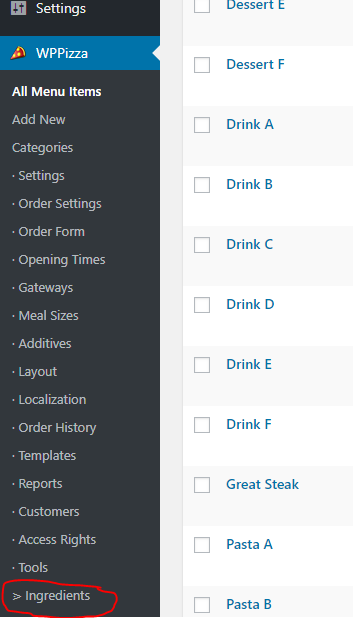
no. you should see a separate “Ingredients” link on the left under the “Tools” link
as in this screenshot
https://support.wp-pizza.com/wp-content/uploads/2018/09/AI-Link-Admin-2.pngi cannot see in your screenshot if it’s there as you cropped it above where it would/should be
(PS: I agree , the description on the screen you are seeing that says – “please go to wppizza->settings->ingredients …. etc” needs to be updated somewhat in the not too distant future, but that does not affect the functionality of it of course)
5 September, 2018 at 2:41 pm in reply to: ingredients to add / change ingredients does not appear in Settings. #39071PS: which version of the add ingredients plugin are you using (just to make sure you are not using some old , outdated version to start off with)
This reply has been marked as private.4 September, 2018 at 11:44 pm in reply to: ingredients to add / change ingredients does not appear in Settings. #39055not sure i understand the question
what choice exactly does not appear?
or – in other words – what are you expecting to see but are not seeing ?the issue i’ve been talking about HAS something to do somewhat with using arrow keys / enter keys / tab keys etc
whether or not this will be exactly your issue i cannot tell you right now.
i’d suggest updating to the latest update when it’s available and check it then (and – in fact – let me know either way afterwards )it’s a bit of a trying to narrow things down somewhat (there are almost countless ways to interact with this thing with the setting of various options)they can be found in the edit screen of each item
see example screenshot here
https://support.wp-pizza.com/wp-content/uploads/edd/2014/09/ai-admin-enableperitem.png>Please watch my uploaded video and test again. I tested it on multiple desktop browsers (Chrome, firefox, safari) on both Mac and PC, the problem still exist.
did exactly that on your staging site
i.e typed in “122 marin pl” then simply used the mouse to select the address from the dropdown available there . again , this worked just fine so cannot reproduce that particular issue (then again , in your video i cannot see any selection by the mouse on the dropdown , though that might be because of the way the video capture worked)However, when messing around with things i did find something that *might* explain what you are seeing in your setup/scenario – even though I cannot reproduce this from here
give me until later today or tomorrow to make an update of the postcode plugin available and test things with that update. *perhaps* this will sort out your issue (and if it does not , at least I am certain it will fix some issues that might occur for others now or in the future)
>Were you using your desktop to reproduce issue? Seems like there’s no problem on mobile but desktop browsers are still not working.
yes, i did use a desktop …. without issues
a) post_theme_setup is not hooked into / called by *ANY* wppizza plugin
b) you are using wppizza_on_order_execute v2 coding with v3 of wppizzahttps://docs.wp-pizza.com/developers/?section=action-wppizza_on_order_execute
in fact i am even surprised that your coding works at all – i would suggest – for starters you get rid of
$order = new WPPIZZA_ORDER();
$order = $order->session_formatted();
as you are overwriting the whole purpose of having this as parameter in the hook in the first place
furthermore
add_action( ‘wppizza_on_order_execute’, ‘print_order’, 1);
should be
add_action( ‘wppizza_on_order_execute’, ‘print_order’, 1, 3);if you want to access all 3 parameters
please refer to the wordpress codex regarding priorities and (number of) parameters of filters/action hooks
Hi
I will take the liberty to copy the essence of the issue here publicly so if anyone else comes across this topic it is somewhat easier to follow
—quote—
You can try typing in this address.
“122 Marin Pl”, then select the address from the google dropdown. In this case it would show the error.
If you try typing “122 Marin Pl, Woodland”, then everything is fine. FYI, Woodland is the name of the city.
————essentially , this – usually – has to do with how google returns addresses from the input dropdown
although you see whole address lines in the input box (none, one or multiple)
addresses are being split into – among other parts – housenumber, streetname, locality , zipcode etc
if for the selected address google does not return the housenumber part (as is the case with some addresses) the system says “ambiguous” as it is being made mandatory that a housenumber of some sort exists , else one would never know where exactly an order should be delivered to.regarding your particular case however , i cannot reproduce what you are describing.
when i type in “122 Marin Pl” and select from the dropdown i do not get any error at all and it works just fine from what i can seeIn fact, selecting from the dropdown would be the most reliable way of selecting an address and your place holder that states “Input your address. Please don’t select from the dropdown” would seem to me to pretty much defeat the point of using this whole thing in the first place.
of course, if google offers an address in the dropdown this is *outside* your set delivery area, then – naturally – selecting this *does* throw a “outside delivery area.. etc ” notice
I will also play with a couple of things here on my install locally with your addresses . Maybe i can force some problems somehow , but at the moment i cannot really see too much of an issue other than what i mentioned above regarding housenumbers etc generally
PS: I did also notice that your pages are minified, if not also cached. perhaps you have still something in your borowser cache that makes things throw erorrs you end ? When plygin around on your site I am also getting a ton of google maps js errors in the console (although as mentioned , the address selection works just fine for me)
have you tried – at least temporarily – to remove all caching and minification ?
ok
2.15 is about 3 years old now !
letters etc as additives numbering was added about a year and a half ago (since v2.16.11.22 )>is there a solution for letters in our Version?
no.there isn’t really any provision for that in the plugin at the moment (other than skipping the installation of default items and categories entirely – see install constants here : https://docs.wp-pizza.com/developers/?section=wppizza_install_constants)
but i’ll make a note of that idea and perhaps add a couple of filters in the next update that would allow you to overwrite the default items/categories etc)
that’s is a completely different issue and my guess is you simply did not enable any gateway
no gateway-> no order button (as you wont be able to order anything if you have no payment method to choose from in the first place) -
AuthorPosts