Forum Replies Created
-
AuthorPosts
-
actually, i believe (try that at least) i know where the problem is
you are using shortcode[wppizza category=’!all,-pizza,-snacks,-desserts,-salades,-pasta,-speciale-aanbiedingen’]
however you have no categories
pizza
snacks
dessertsetc etc
(i can probably do something about accounting for this in an update , however, at th emoment you cannot exclude categories that do not exist)
This reply has been marked as private.This reply has been marked as private.also the output of wppizza->tools : system info please (you can set that as a private reply if you wish )
first of all, i need the version numbers of wppizza and wppizza add ingredients you are using – and/or (preferably also ) a link to you site
that’s pretty much what this enables
https://support.wp-pizza.com/downloads/wppizza-add-ingredients/
see demos
https://support.wp-pizza.com/twentytwelve/
https://support.wp-pizza.com/twentytwelve/our-menu/user/
(alongside other things)then again, maybe you could just re-think your menu items setup and split the whole thing into 2 distinct menu items….that’s entirely up to you of course and I cannot make that decision for you
as you are using a premium wordpress theme, i cannot help you as i have no way of installing this here and see what might be the issue
however, have you followed the steps here
https://support.wp-pizza.com/topic/things-to-do-on-first-install/under option 2 ?
(i.e the bit where you are supposed to copy page.php etc etc )you are not using the grid option…
> If you have to register all ZIP codes within “delivery options”, this will be done manually and it will not make sense to use google maps, do you agree?
(i think i know now what you mean, so ……. kind of. depends on settings , as you can do partial postcodes etc
however, the most reliable way – without a doubt – will be to enter the postcodes you want/need without using gmapthe whole partial thing is for situations where the postcodes in a particular country are a mess and do not follow any particular rhyme or reason (as is the case in many unfortunately)
not sure i understand.
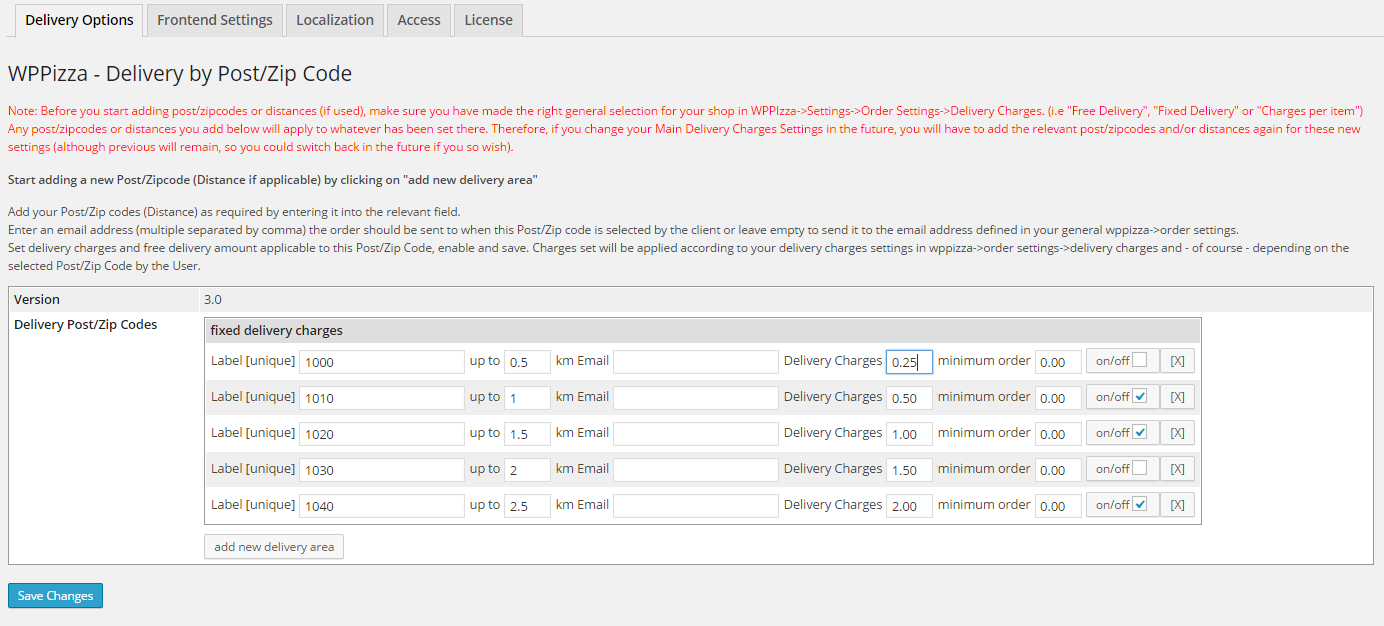
essentially it’s either zip/postcodes OR distance . not both
prices are entered here
https://support.wp-pizza.com/wp-content/uploads/2014/12/wppizza-dbp-delivery.png
depending on your settings, this will look slightly differentwithout a link to your site, i cannot tell you anything
use the layout-> grid option
Hi
there is no provision for that , as I cannot see this making too much sense or be of any benefit really (you can of course already delete/update items on the order page anyway)
However, if you can tell me under what circumstances this could possibly be useful, please explain , and I *may* add this optionthat would probably be a good workaround and the only way I can see to really validate a phonenumber in any case
at the moment, you would have to edit the template or write your own js validation for whatever kind of validation you need for those fields
that said, if someone has no phone, he/she will just type in a fake number , i don’t think you will be able to use the validation for making sure you have a phonenumber that exists …
PS: version 3 will have a number of (infinitely extendable) validation options for those fields inbuilt. just thought i’d mention it
essentially, the functionality works, but there may be somthing in your server setup
check your *SERVERS* [error] logs as that kind of error might not show up in the WP debug logjust copied your “fish one price” to itself (so now you have two “Jacket potato” and 2 “French fries” – delete again if you want ) without issues
perhaps it’s your max post vars
see troubleshooting here
https://support.wp-pizza.com/downloads/wppizza-add-ingredients/3 January, 2017 at 6:50 pm in reply to: Initiator Field In Dabase Not Updated when payment gateway with 2 options #24457you should be able to identify this in your sisow account i would have thought.
(as sisow does not actually return that info after an order has been successful)
that said, there is probably a way to identify this in th ewpppizza orders table too somehow.
however, this is currently not implemented, but i will make a note of it to do this in an update (but o cannot give you an ETA at the moment as to when that will be done)those notices come from using an old version of the plugin.
however, they are unlikely to be the issueif you give me admin access , i can have a look though (reply here with your credentials setting the reply to private if you want me to check)
turn on debug and check your debug log
https://support.wp-pizza.com/topic/how-to-enable-debug-in-wordpress/ -
AuthorPosts