Olly

Forum Replies Created

Viewing 20 posts - 1,201 through 1,220 (of 4,446 total)
  • Author
    Posts
  • in reply to: Private: Question: Google Cloudprint #38001
    Olly
    Admin & Mod

      In a nutshell, what I am trying to say here is that the plugin simply prints to cloudprint as instructed, what your printer makes out of it the wppizza cloudprint plugin has no control over

      If – for example – your printer can only print A5 but decides to try to print A4 from a file sent to it , you should shout at the printer manufacturer and ask for your money back if they claim the printer is cloudprint compatible.
      This really is not a wppizza cloudprint plugin issue or fault.

      in reply to: Private: Question: Google Cloudprint #38000
      Olly
      Admin & Mod

        And while I am at it, here’s another take on how to get things to be printed smaller, simply leaving the default printer page setup as is (in that case A4), but setting the print template css (Wppizza->templates) to be 25% and font-size to 8px like so

        (i.e we are in reality looking at A6 somewhat , and one should simply be able to decrease the width and/or font sizes for smaller formats I would have thought)

        
        html,body,table,tbody,tr,td,th,span{font-size:8px;font-family:Arial, Verdana, Helvetica, sans-serif;margin:0;padding:0;text-align:left;}
        table{width:25%;margin:0 0 10px 0;}
        ... more css ..
        

        would probably benefit from some tweaking for your particular scenario , but you’ll get the idea

        outcome:
        cloudprint template adjust

        in reply to: Private: Question: Google Cloudprint #37997
        Olly
        Admin & Mod

          I feel i need to add to this thread.
          Maybe because we are in 2018 now and things have changed technologically, or maybe the assertions made above were never exactly correct to start off with (this is not a judgement on either, just an observation)

          I do not believe it is true to say “cloudprint does not print in A5” (or similar)
          However, it *might* well be true to say “my printer model xyz does not support cloudprint” and prints some random sizes regardless of what i do .

          To demonstrate: see the following picture (a bit blurred but it should be clear enough).
          cloudprint-demo-sizes

          This is the same order sent 3 times to the cloudprint printer (an epson wf-26something)
          and simply setting the paperfeed on the printer to be A4, A5, and A6 respectively ( printed on A4 paper to better demonstrate the difference.)
          No other changes – i.e to the print template css for example – were made.

          You can clearly see that you can print in whatever sizes if your printer is properly compatible and does not try to print A4 for example if it is an A5 printer

          in reply to: Happy Hour #37983
          Olly
          Admin & Mod

            with coupons and discounts you would have to set the appropriate (simple) discount for each item or multiple items (you can set multiple discounts of course as appropriate). However, depending on what exactly your prices are supposed to be, that won’t be a fast job either.

            That said, i suspect you do not actually really want to apply discounts, but really have the item prices reduced to start off with between certain times, in which case the way to go about that is to write some script that filters the custom post type (in this case wppizza) meta data – that’s where prices are stored for an item.

            you should consult the wordpress codex regarding filtering post type meta data

            Same applies here too though. There is no “simple/fast” shortcut to do this sort of thing

            in reply to: Goodcom Printer Setup #37967
            Olly
            Admin & Mod

              tried searching this forum for goodcom for example?

              in reply to: Simple Discount / only 4 pizzas with a 50% discount #37959
              Olly
              Admin & Mod

                something is clearly missing here in your question (i.e the conditionals)…..

                what you are describing is not a discount but simply something that’s half the price of what it is, so simply set the price to start off with to be 50% of what you have currently

                in reply to: UK Post Codes and Charges Issue #37945
                Olly
                Admin & Mod

                  >just create 2 postcodes and give them any name
                  correct

                  in reply to: Footer : text after summary / totals #37942
                  Olly
                  Admin & Mod

                    there are no provisions for that unless you edit core plugin files directly (which is never, ever a good idea)

                    in reply to: Footer : text after summary / totals #37939
                    Olly
                    Admin & Mod

                      the footer notes text you can set in wppizza->localization->Templates Other->Footer : text after summary / totals …
                      is (currently) only used in email templates (provided something is entered there in the first place of course)

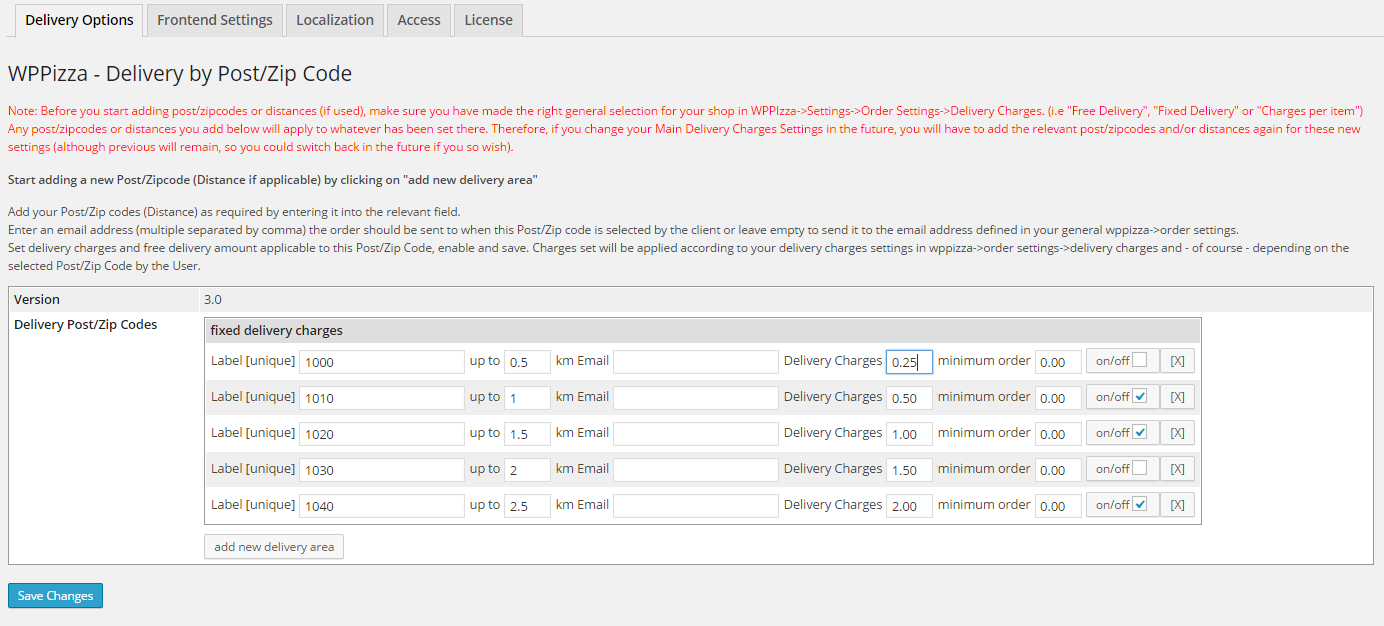
                      in reply to: UK Post Codes and Charges Issue #37930
                      Olly
                      Admin & Mod

                        when you use distances, the plugin does not care what the postcodes are and the labels – although must be unique – have no relation to the postcodes and you can simply name them whatever you want (i.e upto3 and upto5 for example)

                        in reply to: multi language webpage & WP-Pizza #37919
                        Olly
                        Admin & Mod

                          that’s because you did not close the div for
                          “Nous sommes actuellement fermés. Mais vous pouvez pré-commander”

                          in reply to: UK Post Codes and Charges Issue #37878
                          Olly
                          Admin & Mod

                            i assume you are using this ?
                            https://support.wp-pizza.com/downloads/wppizza-delivery-by-postcode/

                            then you should simply use 2 delivery areas (one up to 3 miles and one up to 5) and set the delivery charges accordingly
                            i.e like here https://support.wp-pizza.com/wp-content/uploads/2014/12/wppizza-dbp-delivery.png
                            but only using the two options as described above

                            in reply to: multi language webpage & WP-Pizza #37868
                            Olly
                            Admin & Mod

                              >Theme and dishes, categories …
                              those are completely different things
                              let me rephrase my question:
                              have you gone into wpml -> string translations and looked for the relevant text (ingredients) there

                              in reply to: Print preview #37865
                              Olly
                              Admin & Mod

                                no
                                (i really looked for a solution to this and wished there was. i would also be very happy if someone proves me wrong on that front)

                                in reply to: multi language webpage & WP-Pizza #37859
                                Olly
                                Admin & Mod

                                  have you looked in the string translations ?

                                  in reply to: Google Maps ambiguous addresses #37852
                                  Olly
                                  Admin & Mod

                                    and – as i already told you – your console still says

                                    This API project is not authorized to use this API. Please ensure this API is activated in the Google Developers Console: https://console.developers.google.com/apis/api/places_backend?project=_ For more information on authentication and Google Maps Javascript API services please see: https://developers.google.com/maps/documentation/javascript/get-api-key

                                    so your api key is wrong / not authorized

                                    i also know the gmaps option in the plugin is used in the UK on a number of sites

                                    in reply to: multi language webpage & WP-Pizza #37792
                                    Olly
                                    Admin & Mod

                                      sounds to me you do not have wpml string translation activated/installed

                                      in reply to: Remove ingredients / small changes #37777
                                      Olly
                                      Admin & Mod

                                        “extra” will only be added to any “extra” ingredients (i.e ingredients that are not already pre-selected / standard)
                                        if you don’t want to display something you cannot make it selectable
                                        i.e you cannot have something set as preselected but then not display it if it is selected (pre or not preselected).

                                        i would suggest to you that you either do not have preselected ingredients for something that has things as a standard
                                        (along the lines of: if it’s a hawaii pizza it will always have pineapple. if you dont want pineapple , order another pizza)

                                        and/or you offer the additional option of “No Pineapple” as a topping (but not preselected of course)

                                        you are trying to not show something even if it’s there. that won’t work

                                        in reply to: Add Ingredients "Special" #37776
                                        Olly
                                        Admin & Mod

                                          >… it replaces the first….
                                          you selected “group must have one – and only one – ingredient selected….”
                                          hence you can only choose one with that group type

                                          >… develop a plugin….
                                          sorry, i do not offer customisation or the writing of one-off plugins
                                          https://docs.wp-pizza.com/faqs/?section=customisation

                                          in reply to: Remove ingredients / small changes #37768
                                          Olly
                                          Admin & Mod

                                            ” Add prefix for not pre-selected but additionally added ingredients by customer”
                                            ” do not show “1x” count in cart, order and users account history if an ingredient has only been added 1 time (multiple selections will always have their count displayed)”

                                            ….

                                          Viewing 20 posts - 1,201 through 1,220 (of 4,446 total)