Forum Replies Created
-
AuthorPosts
-
7 October, 2016 at 12:19 pm in reply to: Move "Login as Guest" and "Register an Account" to top? #22321
> re guest/create account
currently this is added like thisadd_action('wppizza_gateway_choice_before', array( $this, 'wppizza_create_user_option'));/**continue and register or as guest**/you could unhook that action and re-add it using the action hooks provided inside the form tag in wppizza-order.php
I would however suggest you leave this as is until wppizza 3.x as this kind of thing will be handled quite differently there and it will be easier to move things around….but up to you of course> re dropdown.
i would suggest you make one of the form fields a select/dropdown and write some js to show / hide things> do not make separated thread only for this question.
why not ?>Sorry my fault..I can see it there..
ok, ignore my post then , seems we had a time overlap>but there is no option to set week days
huh ?
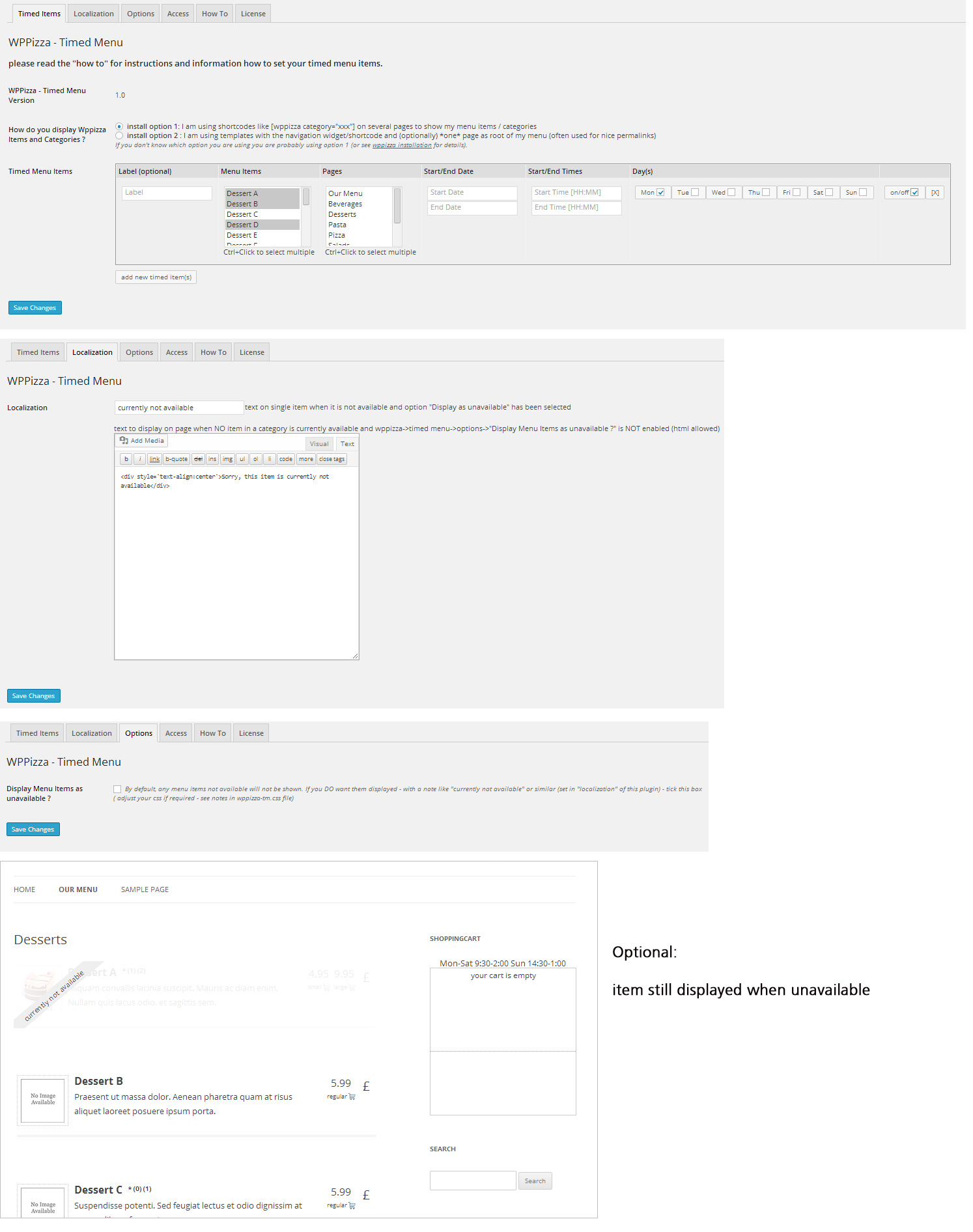
of course there is (and always was)
see screenshot
https://support.wp-pizza.com/wp-content/uploads/2014/01/timed-items-screenshots1.jpgthis should now be fixed with the latest update to the post/zipcode plugin (v3.10.8)
PS: they are not double prices , but the single item price
something like the following in your functions.php
add_filter('wppizza_filter_order_item_markup', 'my_filter_orderpage_items'); function my_filter_orderpage_items($markup){ unset($markup['price']); return $markup; }ok, i see what you mean.
in the meantime – as i believe that will make it work – you could enable “popup on pageload” in the settings screen of the plugin (might be a good idea anyway)seems to me i did not add the functionality on the order/checkout page when nothing was set yet
i’ll have to investigate in more detail. might take a few days thoughwithout a link i cannot comment
as you are using the postcode plugin, the orders will/can be sent to the relevant restaurant / email already
if you want the order history to be separate you will have to set up 2 separate sites (or using subsites in a multisite setup)
see the shortcodes in the “howto”
wppizza -> coupons/discounts -> howto tab
i don’t understand the question (or the problem)
your shop is closed at the moment, so i cannot see.
however, typically it works like this:if you say NO to location tracking, the address field is empty, so you cannot order as it’s a required field
if you say YES but your location is outside your delivery area the address field is also empty, so you still cannot order as it is still a required field
if that isn’t the case, have you tried clearing your cache / cookies ?
you didn’t put a cart on the page
As the underlying code between the print default template and a/the drag/drop email template is the same in large parts, I would have thought just adding a new (format html) email template, doing a bit of dragging and dropping (if needs be, the default is probably just like your print template regarding the order of things) and perhaps removing the background colours of the css (body/main table) would do the job
without a link i can only suggest this
https://support.wp-pizza.com/topic/things-to-do-on-first-install/wherever you want to put it ….
i really don’t understand the question heresorry, but this IS a “separated issue”
the original post here is about some login widget of some sort,your post is about theme/sidebars
>but want also to have support for social login if possible?
then you have to add a social login widget somewhere@ Zia Khan
>But even I cannot find a way to enable a normal Login button
then you have either registrations disabled or are logged in (or both)@ drmt
as this is unrelated to the original post, please start your own – new topic
https://support.wp-pizza.com/topic/forum-rules-read-me-before-posting/
(furthermore, if your theme doesnt provide sidebars, you should speak to the theme author or use a different theme. this has nothing to do with wppizza really) -
AuthorPosts