Forum Replies Created
-
AuthorPosts
-
>You’re right, it was missing a couple of curly brackets.
not only that, but you have one too many too (specifically before that declaration)… re-check your css …ok, wasnt there before (not when i looked anyway)
either way, that declaration is wrong , you have a bunch of syntax errors in that custom css so that declaration never gets read…..
>your new code in the special CSS sectin for my theme
why can i not see that code in the source of your page though ?
i would expect to see this here
view-source:http://www.pizzaventuras.com/puerto-home/
(or in fact in every page)>Just FYI – I added your code to the end of both wppizza-addingredients.min.css and wppizza-addingredients.source.css in the CSS folder for the plugin.
that would be overwritten if you ever update the plugin btw….
hence the https://support.wp-pizza.com/topic/customising-the-add-ingredients-css/but if you use your theme custom css option as mentioned above, just ignore this
my *guess* is you added/created that custom css in the morning and subsequently updated the theme (which will overwrite your changes, hence child-themes are a better idea for exactly that reason)
it doesnt matter though. from what i can see your theme provides a place somewhere to add custom css anyway, so i would suggest you just add it there
i.e add
@media screen and (max-width: 320px)
.wppizza-ingredients ul>li {
    width: 99%!important;
}
(you might have to play with the max-width: 320px – perhaps make it ‘max-width: 350px’ or indeed ‘max-width: 400px’)
max-width: 320px is just educated guess here….
actually , having just a quick glance , you are not using the popup option from what i can see ???
ok, no worries.
am in the middle of something, but give me an hour or so and i’ll see what i can find.
will get back to you here>and then an answer like the one above
you did not ask a question …..
if it worked “in the morning” and then did not work anymore (and the plugin has – clearly – not changed ) then how could it possibly be the plugins fault or problem
moreover, i gave you a quite detailed css declaration (and a link to how to customise the css)
i have no idea what more it is you are expecting (not even mentioning I can only guess anyway as you did not even supply a link to start off with …)
>and I didn’t change a thing!
i most certainly did not either …..Hmm, distinctly strange.
when the check returns ‘OK’ it should simply just reload the page (which it does not in your case for reasons we have to find out)— before doing any of the below it would probably be a good idea to make a backup —
first thing to do : enable debug like so https://support.wp-pizza.com/topic/how-to-enable-debug-in-wordpress/ and see if anything appears in your debug.log
(although to be honest i think this is a js issue not a php issue)second – temporarily at least or in a test environment –
disable ALL other plugins (apart from th emain wppizza plugin and the coupon code plugin)
if it works then, re-enable one by one (and let me know which one causes the issue)third – of above does not work, not only disable all other plugins , but also use a default theme (like 2016) and see if it’s in the theme somewhere (as it would be if it works with a default theme)
4th – if none of the above make any difference, please install https://en-gb.wordpress.org/plugins/duplicator/
and contact me again here (we’ll have to go into more detail then)
all i get with that code – at the moment – is
[108] weekday:code currently in-activewhich means exactly that. I cannot see the issue you are describing (but i assume that would need a code that – in theory – should be valid) ….
if you want to charge by distance , you HAVE TO use google maps.
once you do, you set the charge per distance as required in the settings of the post/zipcode pluginthe options available in the “delivery options” tab of the plugin follow what you have set in the “order settings” of the main plugin
>2 per row
that’s not strictly true.
by default, it shows 3 per row and for small screen devices – up to 400px – 2 per row
it will always depend on your ingredients (i.e the names and name lengths) whether this is adequate for your particular scenario. if it is not (as seems to be the case in your situation) you probably want to add some more css / media query for smaller things. example (for up to 250 lets say, one per row)@media screen and (max-width: 250px){ .wppizza-ingredients ul>li{width:99% !important;} }or similar
see also https://support.wp-pizza.com/topic/customising-the-add-ingredients-css/
cant really comment without a link where you are experiencing this issue
sorry, i do not understand the difficulty here (maybe i am missing something though)
i.e
the link should be as described – with your domain and chosen page – with the relevant coupon code after the “wppcc”just a bit of an explanation why removing of version numbers for scripts/stylesheets is a bad idea:
consider the following scenario:
with version numbers removed you get the following in your page
http(s)://www.domain.com/wp-content/plugin/some-plugin-or-theme/script.js
instead of
http(s)://www.domain.com/wp-content/plugin/some-plugin-or-theme/script.js?ver=2.0(assuming for this exercise it’s version 2.0 intitially for the plugin/theme for example)
so, when someone comes to your site, their browser will download
…./plugin/some-plugin-or-theme/script.js
so far so good.now we assume that plugin/theme gets updated to v2.1 (2.2,3.0, whatever) with changes to that javascript file (like added ajax request for example or whatever else you can think of)
a day later, after you have updated the plugin, that same person comes to your site again and what’s going to happen – not always, but there’s a distinct possibility – is this:
browser reads page and still finds
…./plugin/some-plugin-or-theme/script.js
browser says “oh, I already have that file in my cache, no need to download it again” so uses that cached version. of course, that version does not have those added ajax request etc and your site will fall over / not work / have issuesif it had a version number, the browser would have known it’s different and would have downloaded that new file instead of using the old expired one…..
same would go for css and any other linked files too (how about a css saying originally display:block and then display:none somewhere , etc etc)the above is just to get you an idea and not comprehensive or complete (there are ways to overcome this in other ways, but that’s a different conversation and – in any event – overkill, unnecessary and personally speaking silly given that the whole version numbering is there for exactly that purpose)
>Can’t update as the license has expired,
…err, no. it’s the main plugin i’m talking about which – of course – has no restrictions of that kind>and we haven’t removed the version numbers (on purpose that is).
then some plugin has (look at your source code, there are no version no after any files)tried updateing the plugin …..??????
furthermore , it’s a REALLY BAD idea to remove version numbers from your scripts/css…>I need to insert a three-thirds option on the pizza. Can you do this for me?
no, sorry. it “only” supports whole/half/quarters
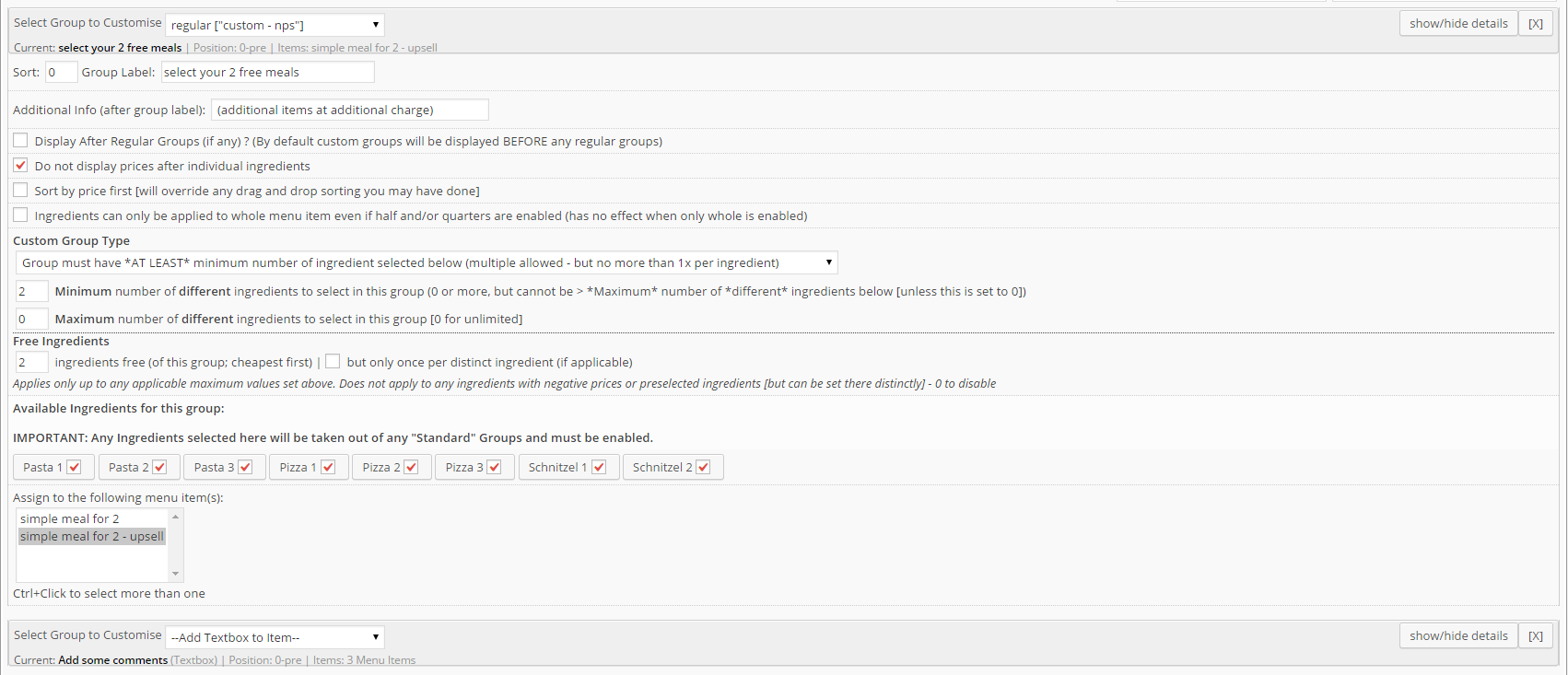
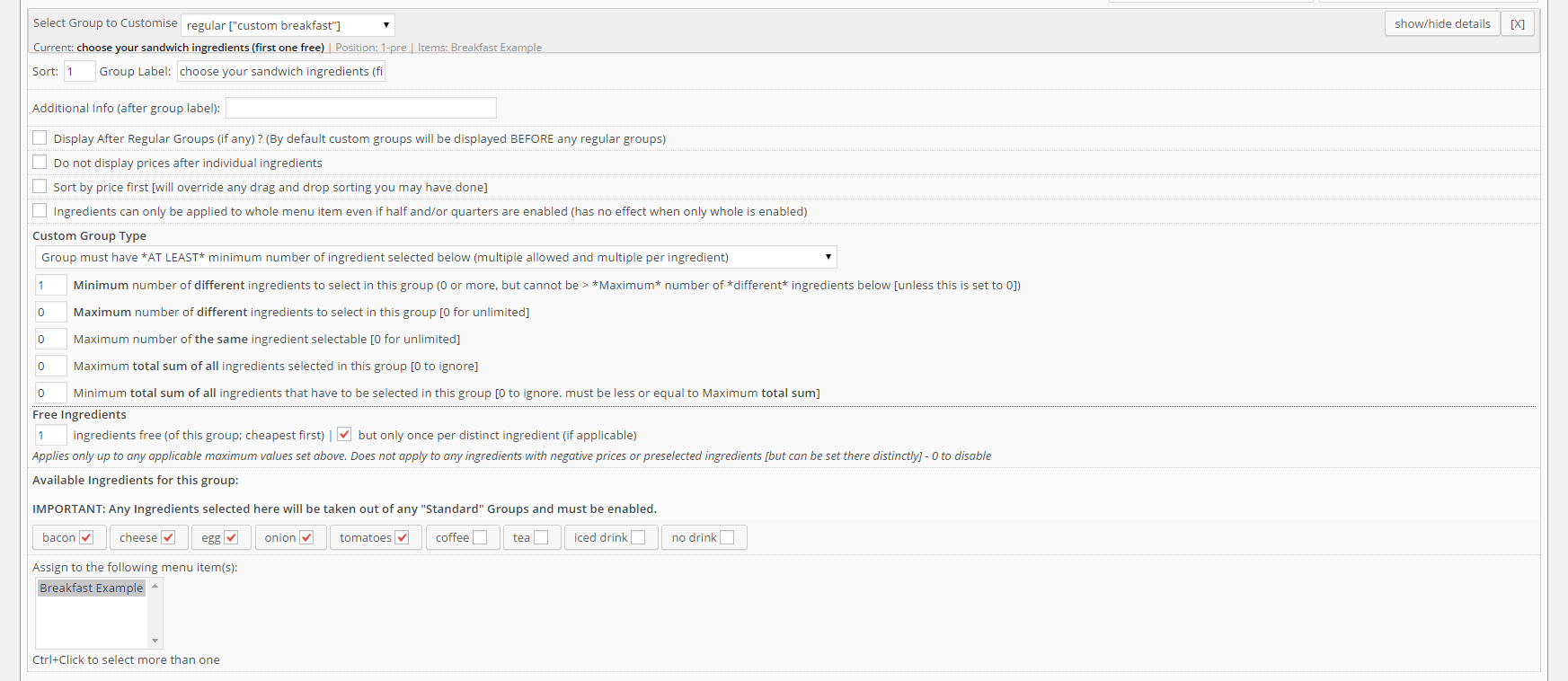
>I need to be able to choose up to 2, 3 or 4 flavors of the items registered in that category
if you choose the appropriate custom group type, you can restrict the number of ingredients (toppings/flavours) for that group
see example/screenshot here
https://support.wp-pizza.com/wp-content/uploads/2014/11/cg-simplefor2-upsell.png
or here
https://support.wp-pizza.com/wp-content/uploads/2014/09/ai-breakfast-cg1.png12 December, 2016 at 1:14 pm in reply to: How to check customer is new or old inside hook wppizza_on_order_executed #24007check the wp_user_id in the {prefix}_wppizza_orders table
it corresponds to “normal” WP users -
AuthorPosts