Forum Replies Created
-
AuthorPosts
-
if that isn’t the case, i would need admin access to have a look please..
line 12 of v2x.php has nothing that declares anything in that file
it simply saysif (!class_exists( 'WPPIZZA' )) {return;}
line 607 too has only a}looks to me like an edited plugin…..
ignoring this for the moment, although i might be wrong, it sounds more like you have the plugin installed 2x somehow
just set the minimum order value , no ?
https://support.wp-pizza.com/wp-content/uploads/2016/02/cad-coupon-codes-admin-screenshot-v1.4.pngplease contact ibacstel
http://www.ibacstel.com/wppizza-iconnect-extension.php2 February, 2017 at 11:10 pm in reply to: Different number of free ingredients for different menu size #25211did you use the copy function ?
shouldn’t take that long (unless there are 100’s or 1000’s)2 February, 2017 at 4:30 pm in reply to: Different number of free ingredients for different menu size #25206>Important is the handling for the Order user
i agree2 February, 2017 at 4:17 pm in reply to: Different number of free ingredients for different menu size #25204essentially, you are – somewhat – creating a kind of special offer.
I.e buy three, five or seven free and get additional at whatever cost you choose, which isn’t really what the plugin was created for but doable nevertheless2 February, 2017 at 4:14 pm in reply to: Different number of free ingredients for different menu size #25203it’s also a somewhat unique setup you are trying to achieve and just a way to make it work regardless.
it would be easier of course if one were to be able to just exclude a custom group from a size altogether or some such thing, instead of adding additional exclusion groups. alas , this is not implemented at the moment though might be one daytypically you do not have the same ingredients/topping (whatever you want to call it) multiple times for an item. furthermore they MUST have different id’s (reason for copying it)
>Its not the smartest way to handle my problem,
as i said, the easiest would be to have 3 different menu items. after all the plugin cannot possibly cater for every single unique way people want to do things. That said, it’s clearly still possible – as outlinedwppizza does not send faxes.
if you have some fax thing integrated, speak to them
secondly, please start new topics instead of replying to something completely unrelated
https://support.wp-pizza.com/topic/forum-rules-read-me-before-posting/2 February, 2017 at 2:28 pm in reply to: Different number of free ingredients for different menu size #25200it’s doable albeit not quite as straight forward as – presumably – you want to offer the same flavours for all three
reading your scenario, there is perhaps a way to an an option for this in the plugin at some point to make this simpler. alas , at the moment you would have to do wither of the followingoption a): much simpler, but not really what you are asking for (but thought i’d mention it anyway).
– create 3 distinct menu items “3 balls”, “5 balls” , “7 balls”
– create all your flavours as ingredients
– create 3 custom groups, each having all the flavours but setting min/max requirements distinctly for each (which is why you need 3) and assign them to the menu items created aboveoption b) – i.e keeping one menu item with 3 sizes (3,5,7)
– create all your flavours as ingredients
– copy all these flavours 2x. So you end up with 3 times the same bunch of flavours (as every ingredient in a menu item must have it’s own id)
– create 3 custom groups, each having all the flavours but setting min/max requirements distinctly for each (which is why you need 3) and assign them to the 3,5,7 menu item above
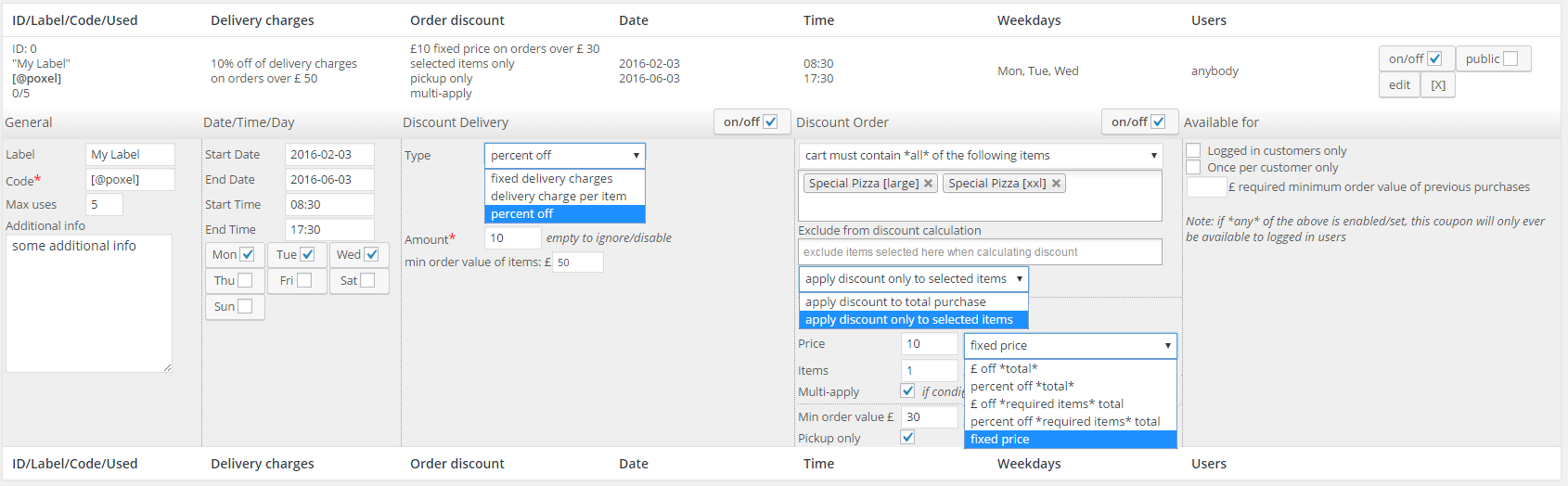
– create 3 more custom groups,using “exlude” option to exclude as required (if all items from a group hve been excluded, the whole group will not show up anymore)reading this through, i actually created this here with screenshots (as it might be be helpful)
this one would allow you to do that (and more)
https://support.wp-pizza.com/downloads/wppizza-coupons-and-discounts/there is no easy way to do this other than jumping through A LOT of hoops (you would have to write your own plugin filtering carts etc – see codesnippets)
alternatively – you could be setting up 2 sites (in a multisite setup perhaps) and using one for delivery and one for pickupgoogle cloudprint/drive stores things in pdf as far as I remember so you can probably just print from there
other than that you would have to do your own research regarding php/pdf libraries etc. I’m afraid
i really do not understand why you would want to send this attachment to everybody that might be set up as recipient and not just to one dedicated email that can actually do something with it
i.e on order execute hook create your file as you described above and then just send it along these lines
		/*email parameters - tweak as appropriate */
		$headers   = array();
		$headers[] = "MIME-Version: 1.0";
		$headers[] = "From: Sender Name <[email protected]>";/**who its from->edit as required**/
		$headers[] = "X-Mailer: PHP/".phpversion();
/* you might need some more headers like content type etc to do attachments properly */

		$to = '[email protected]';/** edit as required **/

		$subject = 'my attachment';/** edit as required **/

		$message = 'my message';/** edit as required **/

		$attachments   = array();
		$attachments[] = "[absolute/path/to/attachment]"; /** edit as required **/


		/*send the email*/
		$send_attachments =wp_mail($to, $subject, $message, $attachments);
not tested , but this sort of thing anyway
26 January, 2017 at 11:15 pm in reply to: Orders doesn’t work when e-mail customer is from Gmail, Hotmail, Yahoo #25015you also want to check this here
http://www.butlerblog.com/2013/09/24/troubleshooting-the-wp_mail-function/especially the stuff under
“What are your host’s email policies?”26 January, 2017 at 10:50 pm in reply to: Orders doesn’t work when e-mail customer is from Gmail, Hotmail, Yahoo #25014you should also check – if using some mail/smtp plugins that the authentication – if used- matches things (just stumbled across the below)
“…..address to a different value than what you authenticate with may help mark your Email as Spam. Namely Gmail, Hotmail and Yahoo Mail……”
taken from here
http://wordpress.stackexchange.com/questions/178468/change-default-wp-mail-from-without-affecting-gravity-formssounds pretty much like your issue
26 January, 2017 at 5:31 pm in reply to: Orders doesn’t work when e-mail customer is from Gmail, Hotmail, Yahoo #25003furthermore, your theme not only loads 2 different versions of jquery for unknown reasosn, it also outputs scripts and html AFTER the closing tag
that’s just wrong and will no doubt break things sooner or later26 January, 2017 at 5:25 pm in reply to: Orders doesn’t work when e-mail customer is from Gmail, Hotmail, Yahoo #25002the screenshots you sent are exactly the ones i needed. thanks.
however , if all other emails work then there is a server issue
it might well be that your server is blocked by gmail/hotmail/yahoo
you should speak to your host about that (perhaps missing PTR/MX/DMARC entries)furthermore (probably the first thing to test / do ) try using SMTP, this might help
see your own http://sd-1257395-h00005.ferozo.net/wp-content/uploads/2017/01/1.png(and of course enable it)
also , i would suggest you enable debug – might tell you something (https://support.wp-pizza.com/topic/how-to-enable-debug-in-wordpress/)
your most likely issue is that you have not set a from email address that corresponds to your server
looking at this
http://prnt.sc/e0bvo6
your *from* email is set to “[email protected]”. this should be something that corresponds to your domain !
(you will also have a big red DMARC notice at the top of your screen that will tell you about this)pics look ok
is your shop email address something like [email protected] ?
(i.e do you get a big red DMARC notice at the top of your admin screen or not )in any event, with your settings, if it’s sent to the shop, it’s sent to the customer (it’s simply a cc)
if it does not go there, your mailserver has an issue (perhaps not the proper MX/PTR/DMARC etc etc entries)
essentially, this has nothing to do with the plugin, but the mail server setup somewherespeak to your host. they should investigate those emails
as i said, with your settings the customer gets THE SAME email in cc so if it does not get there they(your email host) should investigate -
AuthorPosts